Trying to find an alternative to Com0com after running into compatibility issues on Windows 11. I need a reliable virtual serial port emulator for my project and Com0com just isn’t working for me anymore. Has anyone found a good replacement that works well with newer Windows versions? Any suggestions would really help.
Decoding the Hunt for a com0com Substitute
Ever spent a whole afternoon untangling serial port communication issues? Yeah, me too—it’s like trying to fix Christmas lights after your cat had a field day. So, after a bunch of coffee and some ill-advised googling, I hit upon something neat: Virtual Serial Port Driver.
Serial Port Tools: My Actual Grievance
Can we talk about how you start out with com0com thinking, “Sweet, this’ll handle my app testing needs,” and suddenly you’re elbows deep in driver signing errors and forum posts from 2010? Been there, got the headache. Not all superheroes wear capes, but some apps do promise to untangle this mess way easier.
What I Actually Needed
Let’s see—requirements checklist:
- Fake serial ports (that show up like real ones)

- Pair them up, like digital walkie-talkies
- Mash multiple ports into one (for reasons only devs understand)
- Split the data stream like you’re some radio operator from an old war movie
Long story short, Virtual Serial Port Driver didn’t just tick those boxes—it set up camp and made s’mores.
The Features Rundown
Alright, here’s a quick-n-dirty features list:
- Pairs: Link two virtual ports, talk between them as if they’re real.
- Bundles: Group several ports to talk all at once. It’s like a group chat but for serial signals.
- Splitting: One app gets the info, passes it on to others without hogging the line.
Frankly, I was surprised this thing didn’t ask me to pay a subscription fee per virtual port. You just click, set up, and boom—your old serial comm tools are having a field day. No sysadmin degree required.
Wrapping Up
I’m not saying Virtual Serial Port Driver is the messiah of emulated COM ports. But if you’re over com0com’s quirks and downtime, hit it up. Serial port nightmares? Consider them ghosted.
76 Likes
So, I’ve spent WAY too much time banging my head against the com0com + Windows 11 wall, so yeah, right there with you. It’s wild how a simple virtual COM port tool can go from hero to… whatever’s way less helpful than hero after MS updates everything under you. Saw @mikeappsreviewer’s love for Virtual Serial Port Driver (and honestly, it’s solid if you want the Cadillac option), but I gotta throw out a few other routes—in case you’re not looking to shell out some coin or just want to see what’s out there.
If you’re specifically hunting for a drop-in replacement for com0com that just works on Windows 11, first thing I’d check: have you looked at free alternatives like “Free Virtual Serial Ports” from HHD Software? Sometimes their stuff is a bit less “polished”, but gets the job done, and it usually plays nice with newer Windows builds (driver signing can still be wonky tho).
Another under-the-radar, but REALLY handy tool: “Null-modem emulator (com0com-like)” by Eterlogic. It’s called “VSPE” (Virtual Serial Ports Emulator). Kind of a power user’s tool—more control, but def not as click-and-go as Virtual Serial Port Driver. The free version limits you to 1 pair, but for testing or dev, it might be enough.
And tbh, unless you need fancy multi-port splits or advanced routing, a lot of the paid tools might be overkill. Not bashing Virtual Serial Port Driver at all, since a lot of folks (like mikeappsreviewer) swear by it, and it’s probably the least stressful to setup these days—just kind of depends if you’d rather toss money at the problem or tinker for a few hours.
For anyone wondering, the most straightforward, seamless solution right now for a virtual serial port tool compatible with Win11 is probably still grabbing a full-featured virtual COM port app over wrestling old drivers and forum hacks. Not saying it’s flawless (all serial emulators get grumpy sometimes), but at least you won’t spend your week fighting unsigned drivers. If all else fails, you can always spin up a VM running Win10 and use com0com there; not ideal, but for legacy tools, sometimes you gotta get creative.
TL;DR: If you want painless, go for the commercial Virtual Serial Port Driver. If you’re ok with some mild frustration and want free, try VSPE or HHD’s Free Virtual Serial Ports. Either way, RIP com0com on Win11, you were chaotic but useful while you lasted.
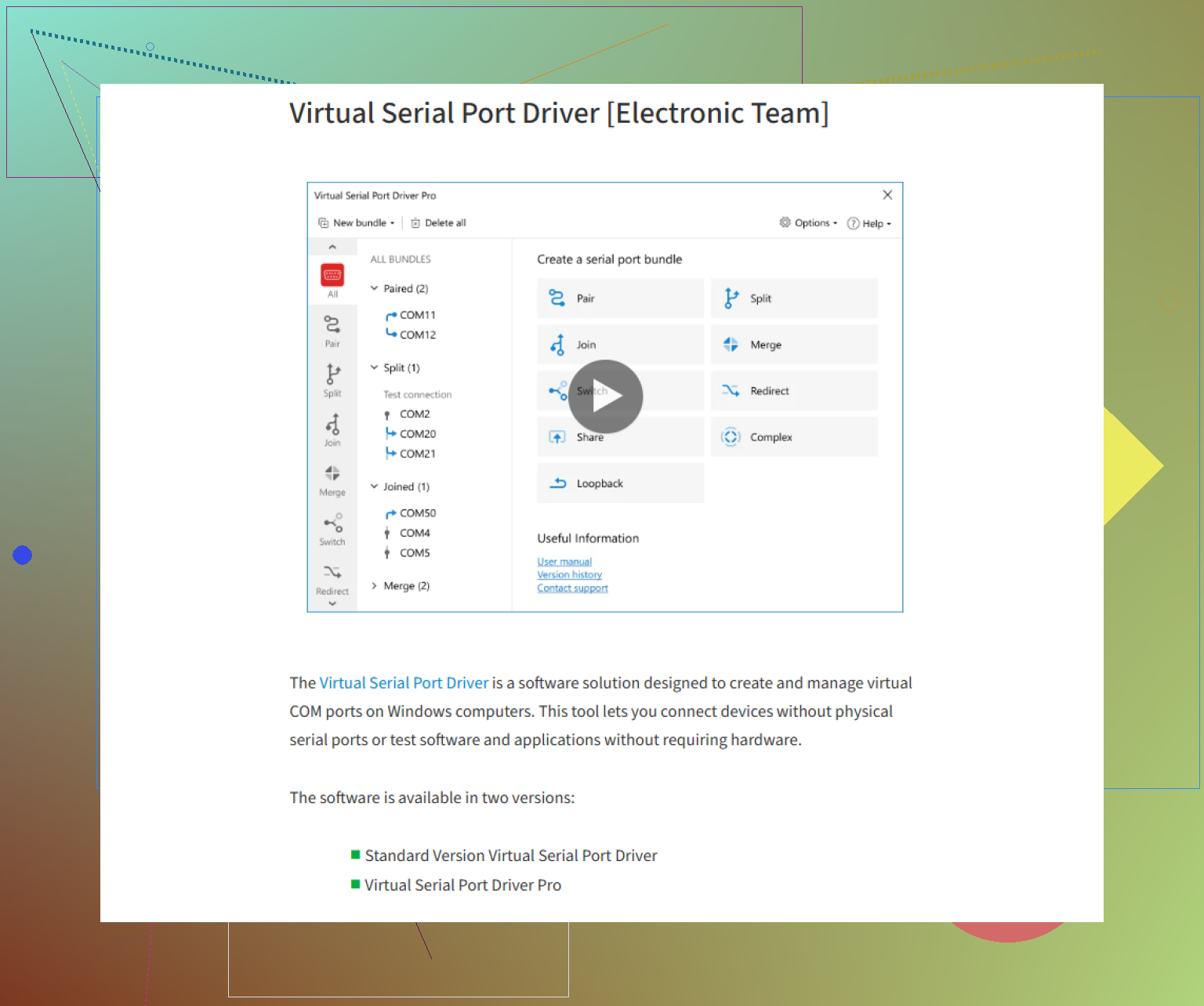
Honestly, I’m a little surprised nobody’s raised this yet: why isn’t Microsoft just building half-decent virtual COM support into Windows by now? But anyway, here we are, fighting the same driver dragons every update. I’ve been through the full cycle: com0com (when it worked), then suffering the unsigned driver circus in Windows 11, and yeah, trying those “kinda free” alternatives like HHD and VSPE — both mentioned above — but man, do they all come with their own flavor of chaos.
So here’s my story: after burning too many afternoons patching .INFs and digging through installer rabbit holes (and don’t get me started on reboots that randomly wiped out my setup), I just gave up and went hunting for something less… historically educational. Stumbled on Virtual Serial Port Driver, nailed a working setup in literally under five minutes (for real, five). Not free like VSPE (unless you’re super-basic with only one pair, then VSPE is fine), but I just needed to get things DONE. Plus, didn’t have to disable driver signing or run sketchy .bat scripts off rando forums.
Not going to drag @mikeappsreviewer and @viajantedoceu, but honestly, I’d skip the free tools unless you love troubleshooting. If you DO need a quick link to get started without playing download roulette, I’d suggest setting up virtual COM ports on Windows 11 hassle-free. Works with whatever legacy apps I’m still forced to use, didn’t break after updates.
And yeah, it makes me slightly annoyed to pay for something that ought to be built in, but hey — it’s probably less than your last Grubhub order. If you ever find an open-source hero that actually supports Win11 with click-to-install ease, please share. In the meantime, VSPD is honestly the path of least headache.
You want alternatives to com0com that actually play nice on Windows 11? Fair. The driver signing gauntlet and ancient forums are enough to make anyone toss their dev rig out the window. I get the appeal of Virtual Serial Port Driver (VSPD)—it just works, and if your time is worth anything, “just works” is a killer feature. On the plus side: clean UI, proper Win11 compatibility, and no need to disable those driver protections. On the minus side: it’s paid after the trial, so if you’re piecing together a bunch of workstations or running on a shoestring, it stings a bit. Still, the hours saved debugging unsigned drivers probably pay for it pretty quick. Competitors like HHD’s Free Virtual Serial Ports and VSPE are out there; some folks swear by them, but they come with their own quirks (limited features, occasional weird glitches, and—yep—still some dance with Windows driver signing). If you just need one virtual pair and can deal with a more barebones setup, VSPE’s free tier might squeak by. But honestly, if your time and sanity matter, Virtual Serial Port Driver is a strong bet—solid support, reliable updates, and you won’t have to dredge up hacked-together scripts from StackOverflow. Downsides: price tag, not open source. Upsides: it’s stable, gets consistent updates, and doesn’t break after every Windows cumulative update. If you ever find a rock-solid, open-source alternative for Win11, please share—until then, reality check: this is as smooth as it gets for now.
You covered VSPD, VSPE, HHD Free, and a Win10 VM. Good sweep. You want stable COM pairs on Windows 11 without driver pain.
Simpler path, go physical. Two USB to serial adapters, 6 USD to 15 USD each. Connect TX to RX cross, ground to ground. This forms a null modem. Windows assigns COM numbers automatically. Test with PuTTY or RealTerm. Throughput up to adapter limit, often 921600 bps. Zero unsigned drivers. Works for legacy apps needing COM ports. I use UGreen or FTDI based units, rock solid tho.