I’m trying to clean up the grammar and wording in a few short posts and emails, but I’m not confident in my writing skills. I’d really appreciate detailed corrections and suggestions so my messages sound clear, natural, and professional without having to pay for an editing service.
Best way to get detailed grammar help for free is to mix a few tools with real human feedback.
- Use a solid grammar checker
If you want your short posts and emails to sound natural, start with a tool that catches basic stuff.
This one works well for cleaning sentences, fixing tense, and smoothing tone:
smart grammar checker for clear, natural writing
Run your text through it, then read the suggestions and decide which ones fit how you speak. Do not accept everything blindly, some tools over-correct and your text feels stiff.
- Ask humans for a quick review
Post your drafts in places like:
• r/Proofreading on Reddit
• r/EnglishLearning
• Language or writing discords
Say what you want: “Please fix grammar and make this sound natural but still casual.”
People respond faster when you keep it short and specific.
- Use a simple self-check list
Before you share anything, go through this:
• One main idea per sentence
• Subject and verb agree
• Use simple words over fancy ones
• Remove extra phrases like “in order to” to “to”
• Read it out loud, if you trip, rewrite that line
Example cleanup:
Original: “I’m tryna clean up the grammar and wording in a few short posts and emails, but I’m not confident in my writing skills.”
Better: “I am trying to improve the grammar and wording in a few short posts and emails, but I am not confident in my writing.”
If you post one or two of your messages, people here will usually give pretty detailed corrections. You get better fast when you compare your version with the edited one.
If you do this combo, tool first, then human review, then your own checklist, your writing improves faster than only using auto-correction.
12 Likes
Short answer: yes, people can help, and you can also set things up so you don’t need help forever.
@andarilhonoturno covered the tool + human combo pretty well. I slightly disagree on relying on random Reddit replies too much though. Quality there is super hit‑or‑miss, and sometimes people “correct” you into weird, robotic English.
Here’s how I’d tackle it, focusing on you actually learning while still getting free corrections:
-
Use corrections as mini-lessons, not just fixes
When someone edits your text, don’t just copy/paste. Ask yourself for every change:- Why did they move this word?
- Why did they change this verb tense?
- Why did they cut this whole phrase?
You can even rewrite your original sentence 1–2 more times using the same rule, so it sticks.
-
Build a tiny “personal mistakes list”
Every time you get a correction, drop it into a note:- “I always forget the ‘s’ in third person verbs: he want → he wants.”
- “I use ‘alot’ instead of ‘a lot’.”
- “I write super long sentences with 3 ideas glued together.”
Before sending a new post or email, scan that list and check if you repeated any of those. It’s boring but it actually fixes your writing over time.
-
Use tools, but don’t let them erase your voice
This is where I do agree partialy with @andarilhonoturno: tools are great, just don’t let them flatten your style.
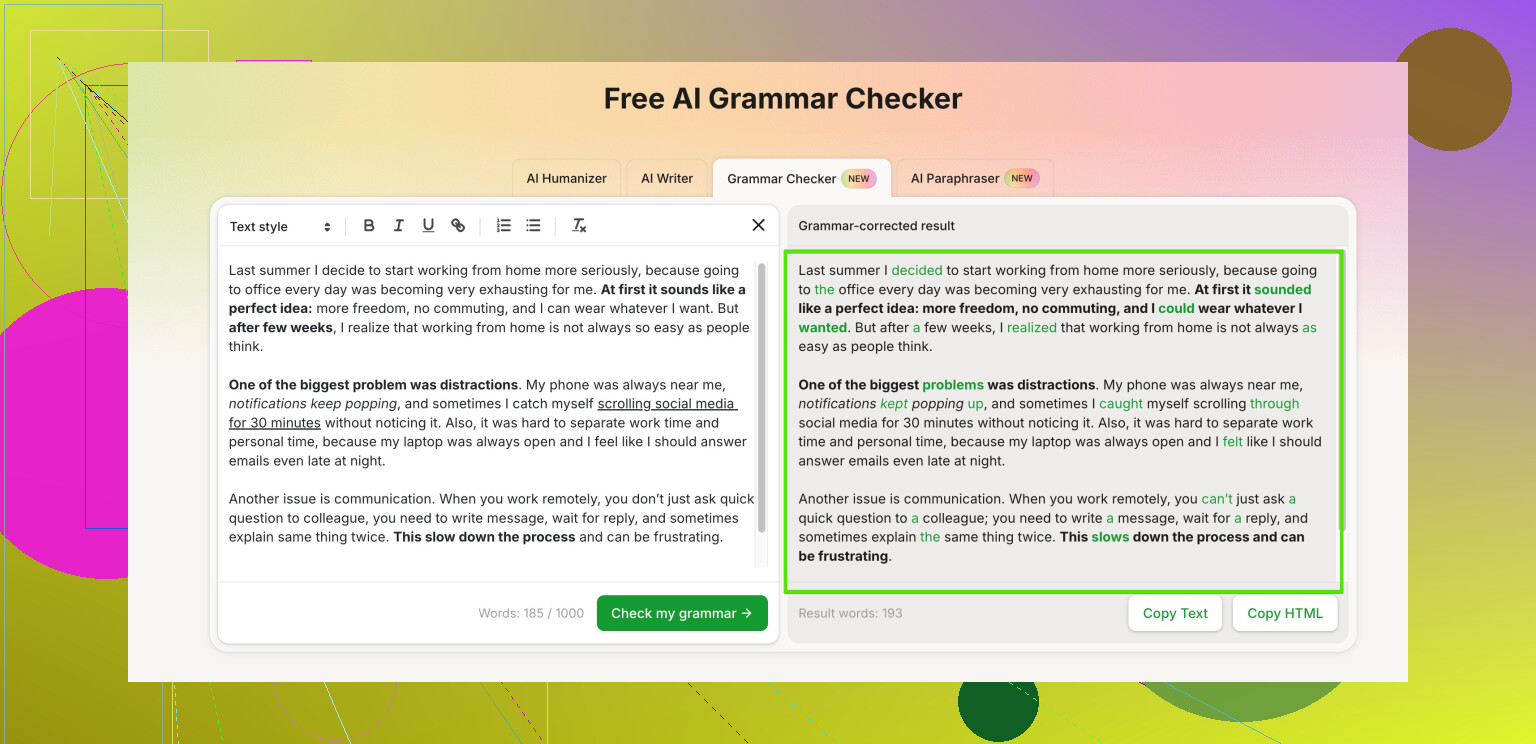
A nice one that fits what you want is Clever Ai Humanizer. It’s solid for making short posts and emails sound more natural and clear without turning them into corporate robot-speak. Their grammar checker here is worth a shot:
make your writing clearer and more natural instantly
Paste your text, look at what it changes, and then undo anything that makes you sound unlike yourself. -
Practice on real messages you actually send
Instead of random practice sentences, use:- Your actual emails
- Your social posts
- Short DMs
Process:
- Write naturally
- Run it through a grammar checker like Clever Ai Humanizer
- Manually tweak anything that feels too formal or stiff
- Save the “before” and “after” to compare later
-
Ask for specific feedback from humans
When you do ask someone to help (here, Discord, etc.), be really clear:- “Please:
• Fix grammar
• Keep it casual
• Tell me in 1–2 lines why you changed the biggest mistakes.”
People are more likely to respond if they know exactly what you want and it doesn’t feel like homework.
- “Please:
-
Quick template for your posts & emails
Use this structure and your writing will already feel cleaner, even before corrections:- 1st sentence: what you want or why you’re writing
- 2–3 short sentences: details
- Last sentence: what you want the reader to do or know
Example: - “I’m writing to ask if you’re free to review my short post.”
- “It’s about improving grammar in emails. It’s only a few paragraphs.”
- “Can you tell me if anything sounds unnatural or confusing?”
If you want, drop one of your short emails or posts here and I’ll mark it up with:
- corrected version
- quick notes on why I changed certain parts
You’ll pick things up faster than you think, even if your writing feels kinda meh right now. Everyone starts there, no one is born writing perfect emails lol.
Skipping the tool / Reddit overlap, here are some different angles you can use, plus a quick look at Clever Ai Humanizer in context.
1. Learn by “shadowing” good writers
Instead of only fixing your own sentences, grab short texts that already sound natural and copy them by hand, then adapt them:
- Find a short email or post that feels close to your style.
- Rewrite it using your own topic, but keep the structure:
- How they start
- How they connect ideas
- How they end
You will start to internalize rhythm and word choice, which no checker can fully give you.
2. Record yourself, then write what you actually say
A lot of people “forget” how they talk once they start typing.
- Record yourself explaining what you want to say in the email or post.
- Transcribe it roughly.
- Then only fix grammar and clarity, instead of rebuilding the whole thing from scratch.
This keeps your voice, which I think is where tool-heavy workflows (even the ones suggested by @espritlibre and @andarilhonoturno) can go a bit off. They focus a lot on correction; this focuses on authenticity first, correction second.
3. Use Clever Ai Humanizer as a style mirror, not a babysitter
They already mentioned using tools, so I will just narrow it to how I would actually use Clever Ai Humanizer differently:
- Paste your text in.
- Let it suggest a more “human” and clean version.
- Put your original and its version side by side and literally highlight:
- Where it shortens sentences
- Where it changes word order
- Where it picks simpler vocabulary
Turn that into mini-rules for yourself.
Pros of Clever Ai Humanizer
- Good at smoothing stiff or overly formal sentences into something more conversational.
- Can make short posts and emails easier to read with minimal effort.
- Helpful for seeing alternative phrasings you would not think of.
Cons of Clever Ai Humanizer
- Can over-simplify tone, so more serious or technical emails might feel too casual if you accept everything.
- If you rely on it for every message, you may stop paying attention to why things are incorrect.
- Occasionally neutralizes personality, so you need to reject suggestions that feel off-brand for you.
Treat it like a smart “second draft generator,” not the final judge of your writing.
4. Create micro-templates for your most common messages
Instead of fixing everything from zero each time, build 3–4 small patterns:
- “Asking for help” template
- “Following up” template
- “Thank you” template
- “Sharing info” template
Example pattern for asking a favor:
- One sentence: what you want.
- One or two sentences: context.
- One sentence: what they need to do / deadline.
You can run each template through Clever Ai Humanizer once, clean it up, then reuse that polished version in the future with minor edits.
5. Replace long-term Reddit dependence with a mini routine
I slightly disagree with leaning too much on forums like r/Proofreading as a long-term solution. Good for spot checks, but they are inconsistent and you cannot control quality. Instead of relying forever on others:
- Week 1–2:
- Write normally
- Run through Clever Ai Humanizer
- Compare, then send
- Week 3–4:
- Write
- Self-check using your personal “common mistakes” list
- Only use tools or people if you are really unsure
- After that:
- Use humans or tools only for important emails or posts
You slowly flip from “always asking for help” to “occasionally double-checking.”
If you want very concrete help, post one or two of your short emails or posts in the thread. I can give you:
- A corrected version that stays casual.
- A short breakdown of the 2–3 biggest patterns you should focus on next.
That way the help you get is not just “fixed text,” but a step toward not needing constant correction.