I need help understanding if my AI-generated content is accurate, trustworthy, and written in a natural human style. I’m not sure where it might sound robotic, be misleading, or miss important details. Can someone review it like a real human would and point out what should be fixed so it’s clear, reliable, and user-friendly?
GPTHuman AI review, from someone who spent too much time testing it
GPTHuman’s tagline says something like “the only AI humanizer that bypasses all premium AI detectors.” I went in curious, not convinced, and came out pretty sure that line is marketing and nothing more.
Here is what happened when I tested it.
GPTHuman AI screenshot
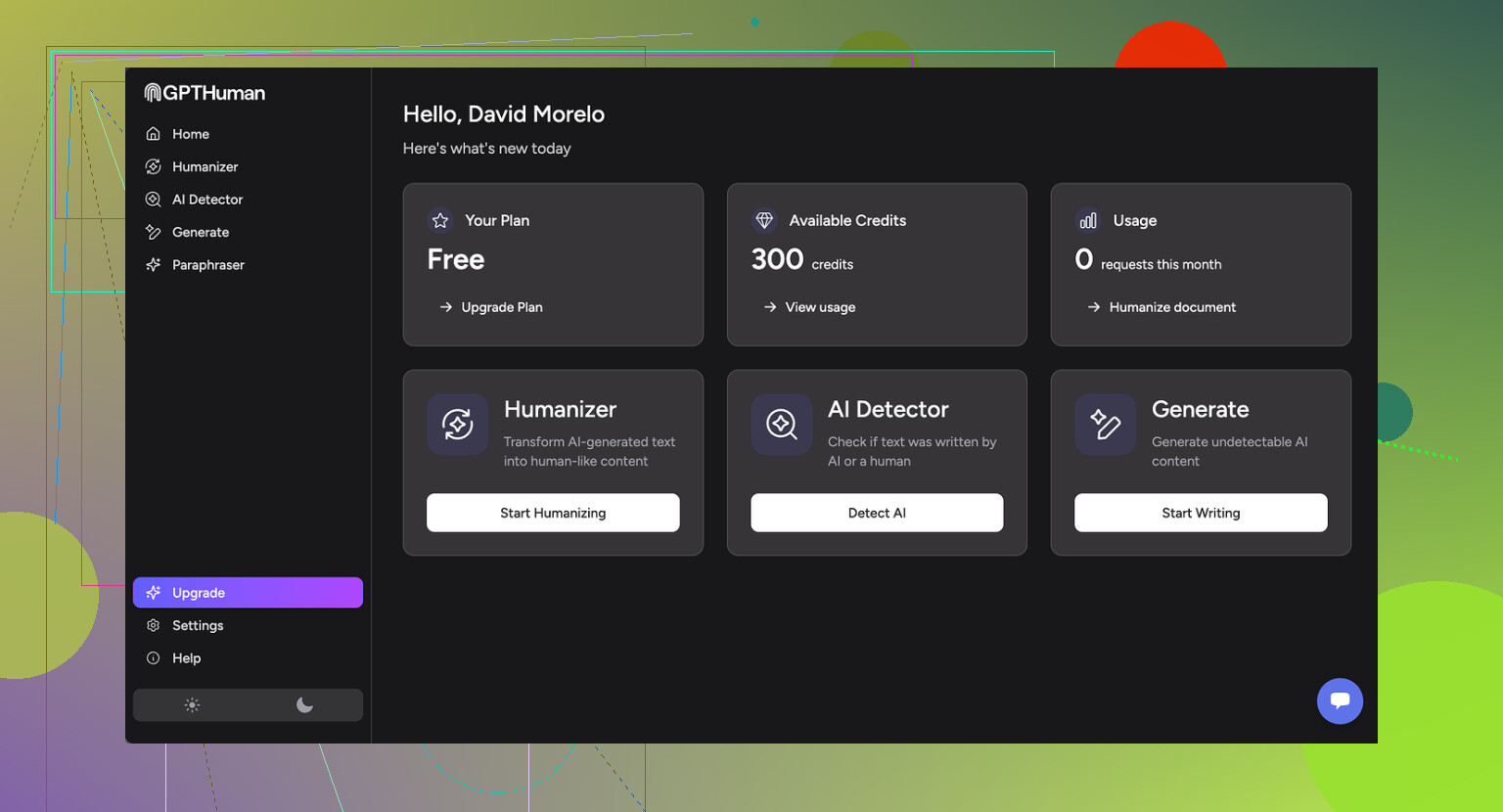
What I tested and how it did with detectors
I ran three different samples through GPTHuman, then pushed those outputs into a few detectors. Same base text, three separate runs, so I could see how much variance there is.
Detectors used:
- GPTZero
- ZeroGPT
Results:
GPTZero
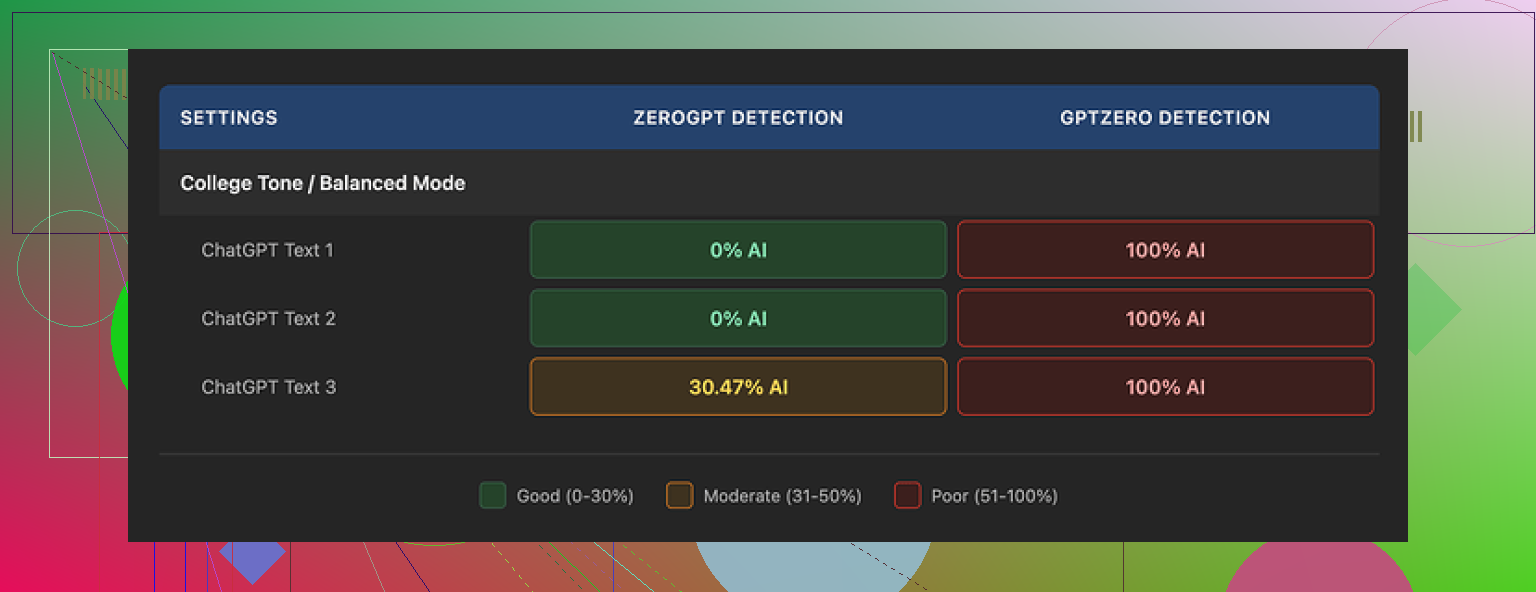
- All three GPTHuman outputs came back as 100% AI.
- No “borderline” scores, it flagged everything hard as machine-written.
ZeroGPT
- Two of the three samples came out as 0% AI.
- The third landed somewhere around 30% AI. Not horrible, but not what you expect from something that claims it beats “all premium detectors.”
The weird part
GPTHuman has its own internal “human score” meter baked into the interface. In my runs, that score looked high, like the tool thought the text was safe. Those internal scores did not match what external detectors reported. If you only trust the internal meter, you walk away with a false sense of security.
If your goal is “I need this to pass GPTZero across the board,” GPTHuman did not do it for me, even once.
Text quality and grammar
Content structure looked fine at first glance. Paragraphs were spaced decently, nothing walls-of-text-tier.
Then I read more carefully.
Issues I hit across multiple runs:
- Subject–verb disagreement
Example pattern: “The results shows that…” type stuff popping up in more than one sample. - Sentence fragments
Some lines started like a proper sentence then dropped the verb or object halfway. - Broken substitutions
It tried to rephrase things and ended up swapping in words that did not fit the context. You get sentences that sound off, like someone used a thesaurus with no understanding. - Awkward endings
Several outputs ended with a final sentence that felt half-done, like it cut off a thought mid-way. You can technically parse it, but it reads like the writer got distracted.
Overall readability:
- You can read it.
- You would not want to paste it into an email or a report without a heavy manual edit.
- If you care about clean grammar, you will spend more time fixing than you save.
Second screenshot for reference
Limits, pricing, and gotchas
Free tier
- You get about 300 words total usage before it locks you out. Not 300 words per run, 300 words in all.
- I hit the cap fast and ended up spinning up three different Gmail accounts to finish the tests. If you want to experiment thoroughly, the free tier feels more like a demo than a usable plan.
Paid plans (at the time I checked)
- Starter: from $8.25 per month on annual billing.
- “Unlimited” plan: $26 per month.
- Even on this plan, single outputs are capped at 2,000 words per run. So if you need to humanize a long report or a full chapter, you will need to chunk the text.
Refund and data policy
- All purchases are listed as non-refundable. So you pay, you are locked in.
- Your content is used for AI training by default. There is an opt-out, but you have to take action yourself.
- They reserve the right to use your company name in their promo material unless you explicitly tell them no. So if your org is sensitive about that, you need to contact them.
You can read more of the original testing context here:
How it compares to Clever AI Humanizer
During the same round of tests, I also tried Clever AI Humanizer, using similar text and similar detectors.
What stood out to me:
- It scored stronger in detection tests overall, especially on the external tools that people actually use.
- Access is better. It was fully free for the level of testing I did, without the “300 words and you are done” wall.
So if your priority is:
- better odds of sliding past detectors, and
- not dealing with strict word caps or a paywall after a few samples,
Clever AI Humanizer felt more practical than GPTHuman in my use.
Bottom line from my runs
If you want:
- guaranteed bypass of all premium detectors
- clean grammar out of the box
- long-form humanization in single runs
GPTHuman did not deliver those things in my tests.
If you still want to try it, treat it more like a starting point and plan to:
- verify every output with external detectors like GPTZero and ZeroGPT,
- manually fix grammar and wording,
- keep an eye on the word caps and the data usage policy.
4 Likes
You are asking two different things that often get mixed up:
- Does my text pass AI detectors.
- Is my content accurate, trustworthy, and natural to read.
Detectors first, then quality.
- About GPTHuman and detectors
I agree with a lot of what @mikeappsreviewer wrote, but I would not obsess over detector scores as the main goal. Detectors misfire on human text all the time, and they disagree with each other.
Still, some practical points:
• Treat GPTHuman’s internal “human score” as marketing, not a signal. Always test with at least two external tools, like GPTZero and ZeroGPT, if detector passing matters to you.
• Expect inconsistent results. You might pass one tool and fail another with the same text.
• If detector evasion is critical for you, you can try tools like Clever Ai Humanizer. People report stronger scores there, and it handles longer text more easily.
I would use any “humanizer” as a small helper, not the main solution.
- How to check if your content is accurate and trustworthy
Use a simple manual checklist:
• Sources
- For every factual claim, ask “where did this come from”.
- Compare key facts against at least two reliable references.
- For anything medical, legal, or financial, cross‑check against official sites or published guidelines.
• Dates and numbers
- Check years, prices, stats, and version numbers.
- Make sure nothing is outdated, especially if the AI pulled older info.
• Overconfident language
- Flag phrases like “always”, “never”, “guaranteed”, “proven”.
- Replace with precise wording and show conditions or limits.
• Missing caveats
- If a statement involves risk, add who it applies to, and when it does not.
- If there are exceptions, mention the main ones.
- How to make AI text sound natural and less robotic
You do not need a “humanizer” for all of this. Simple edits help a lot:
• Shorten long sentences
- Split anything longer than 20–25 words.
- Replace complex connectors with simpler ones like “but”, “so”, “also”.
• Remove filler
- Cut phrases like “as previously mentioned”, “in today’s world”, “it is important to note”.
- Keep direct statements.
• Add specific details
- Replace generic lines like “this method is effective” with “this method helps you reduce response time by about 20 percent in most tests”.
- Give one short example where helpful.
• Adjust tone for the real audience
- For a casual blog, use contractions: “you’re”, “you’ll”, “don’t”.
- For a formal report, keep contractions rare and cut conversational fluff.
• Read out loud
- If you trip over a sentence, most readers will too. Rewrite those lines.
- If it sounds like a corporate blog from 2016, simplify.
- Simple workflow you can follow
Here is a workflow that balances tools and human review:
Step 1: Generate content with your AI tool.
Step 2: Run a fast factual check on key claims, numbers, dates.
Step 3: Do a language pass.
- Cut filler.
- Shorten sentences.
- Fix awkward phrasing.
Step 4: If detector passing matters, run the text through Clever Ai Humanizer or similar.
Step 5: Test final text on GPTZero and one more detector.
Step 6: Do a last read for tone and clarity.
- Where GPTHuman fits in
If you already use GPTHuman:
• Treat its output as a draft, not final.
• Always review grammar. Look for subject verb mismatches, weird synonyms, and sentence fragments.
• Do not rely on its internal “human score” to decide if something is safe to publish.
I disagree a bit with the idea that a single tool failed so it is useless. Sometimes even a weaker humanizer helps break obvious AI patterns. The problem is when people paste, click, and post with no edits.
If you want, you can paste one sample of your AI text here, and I will point out:
• where it sounds robotic,
• where it risks being misleading,
• what details are missing,
• how to rewrite a few lines so you see the pattern.
Short version: if you rely only on GPTHuman to make your content “safe,” you’re putting a lot of faith in a tool that behaves pretty inconsistently.
Couple of points that might help, without rehashing what @mikeappsreviewer and @byteguru already covered:
- Accuracy & trustworthiness
GPTHuman (or any humanizer) is not checking facts. It is just remixing wording. So you can have:
- very “human-sounding” text
- that is still flat-out wrong, outdated, or missing key context
If your topic is anything serious (health, law, finance, technical guides), you really need a separate fact pass:
- manually Google your main claims
- compare against at least 2 solid sources
- cut or qualify anything that sounds too certain like “always works,” “proven results,” “guaranteed”
Honestly, this part is on you, not the tool.
- Where your content probably sounds robotic
Based on what GPTHuman tends to do, the “robot” vibes usually show up in a few places:
- Overuse of generic phrases: “in today’s fast‑paced world”, “it is important to note that”, “in conclusion”
- Repetitive sentence patterns: every sentence starting with “Additionally,” “Furthermore,” “Moreover”
- Vague claims: “This strategy can be very effective for many people” with zero example or number
- Weird synonym swaps: words that technically fit but feel off in casual reading
If a paragraph could appear in literally any blog post on the internet and still make sense, it is probably too generic.
- What to do instead of just “humanizing and praying”
Rather than pass it through GPTHuman and hope, try this quick edit pattern:
-
Cut the fluff
Delete sentences that don’t add a new fact or example. If you can remove a sentence and nothing breaks, it was filler. -
Add 1 concrete detail
Replace “this helps productivity” with something like “this helped our response time go from about 2 minutes to 40 seconds in internal tests”.
One specific detail makes the whole thing feel less AI-blurry. -
Mix sentence lengths
GPTHuman leans into medium-long sentences back to back.
Deliberately add a few short ones.
Then keep one or two slightly longer explanation lines. That natural rhythm is hard for detectors and easier for humans. -
Add a small “but”
Real humans almost always acknowledge tradeoffs:
“This works well if you have time to plan, but it’s annoying in urgent situations.”
AI and humanizers often forget the “but” side of the story.
- About detectors and humanizers
I slightly disagree with leaning too heavily on detector scores at all. Even if you get a “human” flag from GPTZero today, the model or thresholds can change later. There is no permanent whitelist for your text.
That said, if you must worry about detectors:
- Do not trust GPTHuman’s own “human score” as a real metric
- Check with 2 external tools
- Treat humanizers as a light randomizer, not a silver bullet
Since you mentioned wanting natural style, I’d actually look at something like Clever Ai Humanizer as a post‑processor only after you’ve done your manual clean‑up. It tends to give you fewer hard AI flags and has more breathing room for longer text, which is handy if you’re working on full articles rather than tiny snippets.
- If you want people here to actually review your stuff
The fastest way to get useful feedback is:
- post a short chunk (300–500 words) of your AI text
- say what it’s for (blog, email, report, assignment)
- ask 2 specific questions, like:
- “Where does this sound robotic?”
- “Is anything here misleading or obviously missing?”
Then people can point at exact sentences and rewrite them, instead of guessing in the abstract.
Right now, if you’re just feeding text into GPTHuman and assuming the green bar equals “good, accurate, safe,” that’s where you’re likely to get burned. Use humanizers as a noisy filter, not as your editor, fact‑checker, and writing coach all in one.
You are mixing three separate goals:
- “Not obviously AI.”
- “Factually safe.”
- “Feels like an actual person wrote it for a purpose.”
The others covered workflow; I’ll zoom in on how to edit the text itself.
1. Treat tone like a slider, not a switch
Instead of “make it human,” decide:
- Who is talking: expert, peer, brand voice, teacher.
- How much friction is okay: short punchy vs slow and careful.
Then scan your draft once only for mismatches. For example:
- Teaching tone but using dense corporate jargon.
- “Friendly blog” but zero contractions and every sentence perfectly symmetrical.
Fix by choosing 3–4 global rules, like:
- Use “you” at least once per paragraph.
- Contractions allowed.
- Max one “However” per 300 words.
It sounds trivial, but this creates a recognizable voice which detectors struggle with.
2. Use “anchor sentences” to kill the robotic feel
AI and humanizers love safe, center-of-the-road lines. You can inject a human fingerprint with 2 types of anchors:
a) Micro stories (2–3 lines)
Drop in a tiny moment:
“I tried this setup once with a client who swore they had ‘no time’ for documentation. Ninety days later, they had a 6-page playbook and fewer late-night emergencies.”
One of these every few sections instantly breaks the generic vibe.
b) Opinion spikes
Add 1 sentence that clearly takes a side:
“If a tool promises 100 percent detector bypass, assume the marketing team wrote that line, not the engineers.”
This is where @mikeappsreviewer and @byteguru are a bit more forgiving than I am. I think opinionated edges help more than small synonym tweaks.
3. Don’t just “check accuracy,” show how you know
Instead of silently fact checking, expose a little of the reasoning:
- “Most guidelines published after 2022 suggest…”
- “The latest stable version at the time of writing is 2.3.1, so anything about 1.x is outdated.”
Two advantages:
- Readers see the timestamp and scope.
- It forces you to confront outdated info the model may have hallucinated.
If your text cannot tolerate adding these small “how we know” lines, that is usually a sign it is still too vague.
4. Structural trick: write your own intro and outro
Humanizers and AIs are particularly bad at openings and conclusions. They recycle the same frames:
- “In today’s digital world…”
- “In conclusion, it is important to note…”
Solution:
- Delete the AI intro and outro entirely.
- Write 2–3 custom lines at the top:
- Who this is for
- What they get
- One sharp qualifier (what is not included)
Example:
“This guide is for freelancers who already write with AI but are worried about sounding wooden or missing key facts. It will not cover academic citation rules or plagiarism law.”
Do the same at the end:
“If you only take one thing from this, let it be this: tools can smooth your text, but only you can decide what is actually true and worth saying.”
This alone can move a piece from “AI-flavored” to “someone actually thought about my time.”
5. Where Clever Ai Humanizer fits in (and where it does not)
You mentioned tools like GPTHuman, so here is a blunt view of Clever Ai Humanizer as another option.
Pros
- Often reshuffles syntax in more varied ways, which helps with repetitive sentence rhythm.
- Handles longer pieces with fewer hard caps, so you can preserve context instead of chopping paragraphs awkwardly.
- Plays reasonably well as a “final polish” pass once you have already fixed tone and facts.
Cons
- Still does not understand truth. It can confidently rewrite a wrong statement into a nicer wrong statement.
- Can occasionally push language into “slightly off” territory if your original was already very natural.
- If you rely on it too early in the process, you will end up editing its quirks instead of clarifying your own ideas.
So I would slot Clever Ai Humanizer after you:
- Fix the structure (intro, sections, outro).
- Inject a couple of micro stories or opinion spikes.
- Add those small “how we know” or “when this fails” caveats.
Then let the tool smooth edges and break remaining AI patterns, and finally do a human read for odd phrasing.
6. Quick contrast with what others suggested
- @byteguru focused a lot on methodical checking, which is solid, but I think many people get stuck trying to perfect every sentence instead of changing a few high-impact pieces like intro/outro and opinion spikes.
- @viaggiatoresolare highlighted the risk of trusting internal “human scores.” I would go further and say: treat all AI detector output as noisy hints, not a pass/fail gate.
- @mikeappsreviewer did rigorous detector comparisons. My spin is that if you spend more time fighting detectors than clarifying your message, the content will usually feel hollow even if it “passes.”
If you want concrete help, post 1 short section of your content (a single subheading and its paragraph). People here can then mark specific sentences that feel robotic, suggest 1–2 micro stories, and show you how little editing is actually needed to flip the overall feel.