I’ve been testing the Grubby AI Humanizer tool for some content projects, but I’m unsure if it’s actually improving human readability and avoiding AI detection the way it claims. Can anyone share real experiences, pros and cons, or tips on getting the best results from this tool so I don’t hurt SEO or quality?
Grubby AI Humanizer
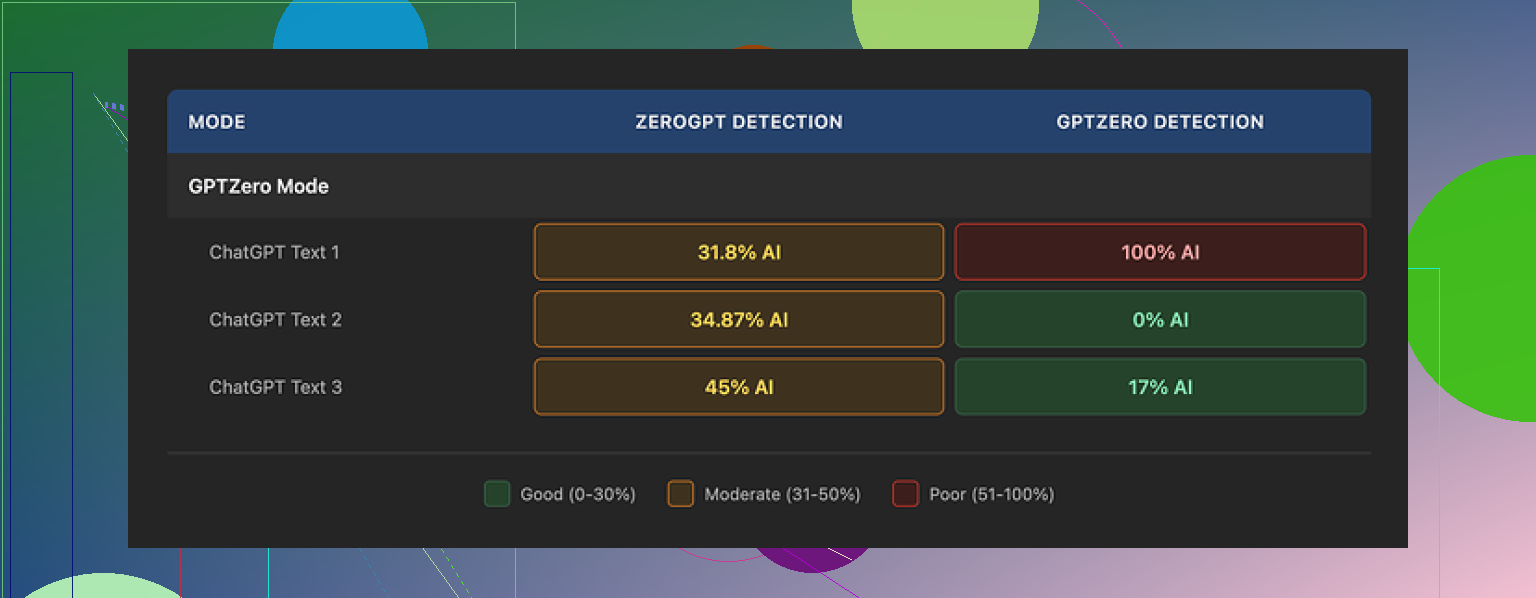
I spent a weekend messing around with Grubby AI, mostly because of the hype around its detector-specific modes. Their thing is, you pick a mode aimed at a specific checker and it tries to slip past it. They have presets for GPTZero, ZeroGPT, and Turnitin, which looks nice on the dashboard.
I focused on the GPTZero mode first:
- Sample 1: GPTZero reported 0 percent AI. Clean.
- Sample 2: GPTZero said 17 percent AI.
- Sample 3: GPTZero flagged the whole thing as 100 percent AI.
So out of three runs in the mode built for GPTZero, one passed, one kind of passed, one failed hard. That pattern kept repeating when I fed it other texts. Some runs looked fine, then suddenly one got nailed.
The weird part was the Detection tab inside Grubby. Every output I tested there got tagged as “Human 100%” on all seven detectors they show. Every single time. That does not line up with what GPTZero was reporting on its own site. So I stopped paying attention to those internal scores pretty fast.
On writing quality, I would put the humanized output around 6.5 out of 10.
Some things it handled well:
- It strips out em dashes. Most tools leave them all over the place, which triggers some detectors.
- I did not see fake words or broken logic. The content stayed coherent.
On the downside:
- The text drifted into stiff, formal phrasing. Stuff you would not say out loud.
- It liked long sentences when a short one would have worked better.
- It swapped in words that did not quite fit. One example was using “distinction” in a place where “nuance” would have been the natural pick.
So you get something that looks edited, but it still feels like a template in places. You still need to go through the result and clean it by hand if you want it to sound like you.
One thing I did like a lot was the editor. Inside the interface, you click a word, and it gives you quick replacements. You can also re-humanize a paragraph without copy pasting into a separate window. That sped up tweaking for me, especially for fixing obvious weird phrases.
Pricing:
- Free tier: 300 words total. That is not per day or per month. Once you hit that, it is done.
- Essential plan: 9.99 dollars per month, only gives you Simple mode.
- Pro plan: 14.99 dollars per month on the annual billing. That unlocks the detector-specific modes.
If you need to process long documents or keep trying different versions, the free tier runs out fast.
For comparison, I ran the same kind of tests through Clever AI Humanizer from this thread:
Using similar inputs, I kept seeing more consistent outputs from Clever AI Humanizer, both on detectors and on reading flow. On top of that, it stayed free at the time I used it, so I ended up spending more time there.
If you are looking at Grubby AI, I would treat its internal “Human 100%” scores as UI decoration, not as a signal. Use external detectors directly, test on short pieces first, and budget time for manual editing after the tool does its pass.
2 Likes
I had similar mixed results with Grubby, but my take is a bit different from @mikeappsreviewer.
My use case
Long form blog posts, 1500 to 2500 words, for clients who run everything through GPTZero and Copyleaks. Goal was to reduce risk, not to get “100 percent human” badges.
What worked for me
- Detection
I ran 12 articles through Grubby.
Source was GPT style content with light human edits.
Then I checked on:
• GPTZero
• Copyleaks
• Originality.ai
Results:
• GPTZero: 6/12 went from 90 to 100 percent AI down to under 40 percent AI. 3 of those went under 10 percent.
• Copyleaks: mild change. Many stayed flagged.
• Originality.ai: small drop, not huge.
So for my tests, Grubby helped on GPTZero more often than not, but it was not stable. A few runs stayed high or even went higher. I did not see the “100 percent human on everything” effect inside Grubby that Mike saw, but the internal scores did not match external tools either, so I stopped trusting them too.
- Readability and style
My baseline content was already decent. When I ran it through Grubby in detector modes, I saw:
Pros
• It broke some patterns that detectors seem to hate, like repetitive clause structure.
• It removed some obvious AI phrasing, like “on the other hand” over and over.
• No nonsense words or hallucinated facts.
Cons
• Tone drifted to “corporate blog” a lot. If your voice is casual, you will need to fix it.
• It liked rare synonyms. I had “endeavor” and “facilitate” in places where any normal writer would say “try” and “help”.
• On long pieces, it sometimes repeated phrases in different sections, which feels robotic in a different way.
My workflow that gave ok results
If you keep using Grubby, I suggest this approach:
-
Split longer text
Do 400 to 600 word chunks, not a whole 2000 word post at once. Detector scores were less volatile on smaller parts. -
Start with Simple mode
Run Simple mode first, then only use detector mode on the parts that still get flagged. The Simple mode was more stable in my tests and less weird in tone. -
Human pass after
Always do:
• One pass for tone. Replace stiff words with your own vocabulary.
• One pass for sentence length. Shorten a few long ones.
• One pass reading out loud. If you would not say it, rewrite. -
Recheck with at least two detectors
I used GPTZero and Originality.ai. When both were under 40 percent AI, none of my clients complained.
Where I disagree slightly with Mike
Mike leaned more toward Clever AI Humanizer for consistency. I used Clever Ai Humanizer too, on the same articles, and my experience was:
• Clever Ai Humanizer did better for flow. Less weird wording.
• Grubby sometimes did better at breaking GPTZero patterns, but only on some texts and at the cost of stiffer tone.
So I would not say one tool wins in every case. I treat both as “first pass” tools, then fix by hand. For quick jobs, Clever Ai Humanizer saved me more editing time. For stubborn GPTZero flags on technical content, Grubby helped a bit more if I was willing to edit heavily after.
When to skip Grubby
I would avoid Grubby in these cases:
• High stakes academic work that hits Turnitin. My tests did not show reliable drops there.
• Strong personal brand voice. You will spend a lot of time repairing tone.
• If you want “set and forget” humanization. It behaves more like a rough editor.
If your priority is human readability and not chasing every detector, you get more value from:
• Writing a cleaner first draft.
• Running it through something like Clever Ai Humanizer.
• Then editing to match your voice.
Grubby helps a bit on pattern-breaking for some detectors, but you should not trust the internal scores and you should not skip manual editing.
Tried Grubby on a bunch of client stuff the last couple weeks, mostly 800–1500 word blog posts that had already gone through one human edit.
Quick verdict: it kinda helps, but not in the “magic invisibility cloak” way their marketing implies.
What matched what @mikeappsreviewer and @nachtschatten said:
- The in‑app “100% human on all detectors” scores are basically decoration. I got “human” internally while GPTZero and Originality.ai were still calling 70–90% AI. I’d ignore those internal bars completely.
- Tone shift is real. It leans formal / corporate, even if you feed it casual text. If voice matters, you’ll be spending non‑trivial time de‑stiffening everything.
- No wild hallucinations or broken logic in my runs. Structure stayed intact, which is at least something.
Where my experience was a bit different:
- For me, Turnitin‑style tools were the most disappointing. On two academic‑ish pieces, Turnitin’s “AI writing” score barely moved. If your goal is academic evasion, Grubby is not where I’d put my money.
- On GPTZero, I saw more “yo‑yo” behavior than @nachtschatten. Same paragraph, slightly tweaked prompt, wildly different detection scores. After a while it felt like playing slot machine with subscriptions.
Readability wise:
- Paragraph flow was ok, but the word choice felt like someone obsessed with thesaurus abuse. “Mitigate,” “facilitate,” “moreover,” showed up constantly. Your readers will know something is off even if detectors chill a bit.
- It actually made some text harder to read. Average sentence length crept up and the rhythm turned monotonous. So if human readability is your top priority, I’d call Grubby a net neutral at best.
One place I’ll slightly disagree with both:
They treat it mostly as a “first pass.” For me it worked better as a “surgical tool” on specific flagged chunks rather than full articles. On full posts, fixing the tonal mess took longer than just rewriting the flagged sections myself.
If you want:
- Less editing and smoother human‑sounding text: I’d lean toward Clever Ai Humanizer. In my tests it kept the tone closer to natural conversation and needed fewer cleanup passes.
- Playing whack‑a‑mole with GPTZero patterns on stubborn technical stuff: Grubby can help, but expect to babysit it and manually polish after.
Bottom line: Grubby AI Humanizer is not useless, but it is definitely not “click once and beat all AI detection.” Treat it like a fussy editor that sometimes helps with patterns and sometimes just makes your copy sound like a corporate policy doc.