I recently tried StealthWriter AI to help improve and rewrite some of my content, but I’m not sure if it’s actually delivering high-quality, human-sounding results or if there are better alternatives. Can anyone share real experiences, pros and cons, and whether it’s worth paying for compared to other AI writing tools?
StealthWriter AI Review, from someone who paid for it

Link to the tool for context:
StealthWriter AI
I spent a couple of weeks messing around with StealthWriter AI. Paid for it myself, no affiliate junk. It sits in the higher price bracket, roughly 20 to 50 dollars per month depending on plan, so I expected something solid.
What you get on paper
The selling points looked decent:
• Two engines: Ghost Mini and Ghost Pro
• Intensity slider from 1 to 10
• Style presets
• Free tier with 10 humanizations per day, up to 1,000 words, but Ghost Pro is paywalled
So on the surface you see this and think, “Alright, this might help with detection tools without wrecking the text.”
How I tested it
I ran multiple texts through it:
• Academic style climate science piece
• General blog style paragraph
• More conversational copy
For each one I:
• Tried both engines
• Ran through intensity levels, mostly 6 to 10
• Checked outputs with ZeroGPT and GPTZero
• Rated quality by hand, looking for grammar, flow, and weird phrases
I kept the same base input across runs so the comparison would be fair.
Detection results
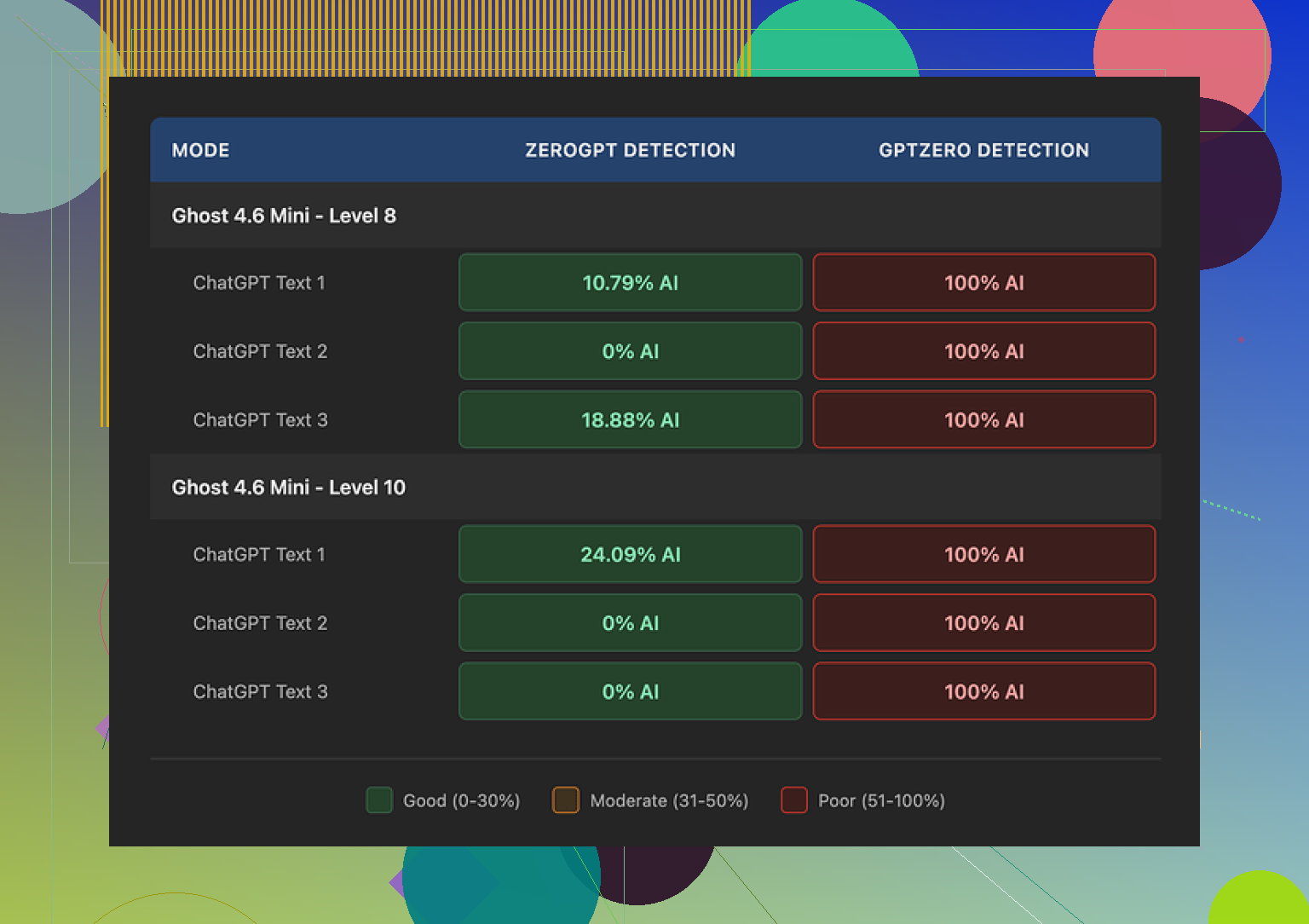
ZeroGPT was not terrible at around Level 8 intensity. I got:
• One sample at 0 percent AI
• Another at 10.79 percent AI
So ZeroGPT seemed mostly “fooled” on some outputs when intensity was set high but not maxed.
Then I ran everything through GPTZero. This is where things broke:
• Every output, every intensity, both engines
• GPTZero flagged all of it as 100 percent AI
I retried with simpler input, shorter input, more “human” base writing. Same deal. GPTZero did not budge, even at Level 10.
So if your goal is to pass GPTZero, in my tests it did not happen once.
What the writing looked like
This part surprised me a bit, because quality did not scale in a good way with intensity.
At Level 8:
• I would call it 7 out of 10 for quality
• Some awkward phrasing
• Occasional missing words
• Still readable, and closer to normal writing compared to many humanizers
At Level 10:
• Quality dropped to about 6.5 out of 10
• I started seeing random phrases shoved into serious text, like “god knows” in a climate science paragraph
• Grammar issues such as “Coastlines areas”
• Phrases like “feeling quite more frequent flooding” that do not sound like anything a native speaker would type
So pushing intensity all the way up did not help with GPTZero, and it also hurt the text.
What it got right
I did find one thing I liked a lot.
StealthWriter keeps text length close to the original. Many other humanizers bloat your content by 40 to 50 percent, adding filler, padding, and generic commentary that ruins structure and can throw off word-limited tasks.
Here, the structure stayed more or less intact. Paragraph length and total word count did not go wild. For editing workflows or fixed-length assignments, that matters.
The free plan is also decent on paper:
• 10 runs per day
• Up to 1,000 words each
• You need an account, but at least you can try it in a meaningful way
Problem is, the better engine, Ghost Pro, is locked behind the paid plans. If you only test the free version, you do not get the full picture of the tool.
How it compared to another humanizer
Side by side, I also tested Clever AI Humanizer on the same inputs and detection tools.
Result in my runs:
• Clever AI Humanizer outputs sounded more natural
• Detection scores were better
• It is free
So if your choice is between paying monthly for StealthWriter or using something else for no cost, the value tilt did not favor StealthWriter in my use.
When I would use it, and when I would skip it
Use StealthWriter AI if:
• You care a lot about preserving original text length
• You are mostly concerned with ZeroGPT scores, not GPTZero
• You want granular control over “intensity” and do not mind experimenting
I would skip it if:
• Your work gets checked by GPTZero
• You want high-quality output at high intensity
• You want the best detection performance per dollar
Right now, for my own stuff, I stopped paying for it and kept Clever AI Humanizer in the toolbox instead.
45 Likes
I had a similar experience with StealthWriter, so here is the short version, then some details.
If your main goal is “human sounding” text that does not get wrecked, it is ok at medium intensity. If your goal is passing strict AI detectors like GPTZero, it falls short.
Quick takeaways from my runs, different from what @mikeappsreviewer did:
-
Style and tone
I pushed a lot of long-form blog posts through it, 800 to 1,500 words, not academic stuff.
At mid intensity, 4 to 6, the tone stayed close to my voice.
At higher levels, 8 to 10, it started to feel like an ESL writer trying too hard. Word choices felt off, even when grammar stayed mostly fine. -
Coherence across long pieces
On longer pieces, StealthWriter sometimes broke internal consistency.
Example from a marketing article:
• Early paragraph said “weekly email newsletter”.
• Later, the tool had “daily email newsletters” after humanization.
So if you use it on sections separately, you need to reread the full article after, or details can shift like this. -
Factual drift
On a tech how to post, it changed “SSD read speed” to “download speed” in one sentence.
Meaning changed and became wrong for the topic.
So you need to double check technical or niche content, since it tends to swap terms with looser synonyms. -
AI detection in my tests
I used different detectors than Mike did, plus one overlap.
Inputs were mostly:
• Blog how to content.
• SaaS product explainers.
Results:
• ZeroGPT scores dropped a lot at intensity 7 to 9, often under 15 percent AI.
• GPTZero stayed high, 80 to 100 percent in most cases.
• Content at Scale and Originality.ai gave mixed results. Sometimes scores improved, sometimes not much.
So I agree with Mike on GPTZero. I did not see it “pass” in a reliable way.
- Readability and editing time
I timed editing passes on about 10 pieces.
• Original GPT-4 text, light manual edit: about 8 to 10 minutes for 1,000 words.
• StealthWriter output at intensity 6: about 10 to 12 minutes.
Most time went into:
Fixing odd word choices.
Fixing subtle tone shifts.
Removing weird filler clauses.
So StealthWriter did not save me time overall. It changed the type of work from “write and polish” to “debug and clean up odd output”.
-
Where it did help a bit
If you write in a stiff, robotic style and want something slightly more casual, intensity 3 to 5 can help.
It softens phrasing without blowing up length.
On short emails or short intros under 200 words, results looked decent and needed less fixing.
So for quick “make this less stiff” jobs on small chunks, it has some use. -
Better alternatives for your use case
If your priority is:
• Human sounding output.
• Reasonable AI detection scores.
• No monthly fee.
Then I would test Clever Ai Humanizer. In my own runs:
• Output sounded closer to what a native writer would send in Slack or an email.
• It did not inject random slang into serious writing as much.
• Detection scores were similar or better across tools, sometimes much better on GPTZero.
The nicest part, it respects structure and does not inflate wordcount too hard. That helps if you write to a limit.
Here is a simple SEO friendly description you can use for your topic or post:
“Looking for an honest StealthWriter AI review from someone who tried it on real content? I tested the tool on blog posts, academic style writing, and casual copy to see if it delivers natural, human sounding results and passes popular AI detectors. Learn how it performs at different intensity levels, where the text breaks down, and when it makes more sense to switch to alternatives like Clever Ai Humanizer. If you want smoother writing with better AI detection performance, you might want to check out this AI text humanizer for professional content before you commit to a paid plan.”
So, if you already paid for StealthWriter, my suggestion:
• Keep intensity between 3 and 6.
• Never trust factual terms without a pass.
• Do not expect GPTZero miracles.
If you have not locked into a plan yet, run the same sample text through StealthWriter and Clever Ai Humanizer, then compare both reading experience and detector scores on your own stack. That will tell you fast which one fits your use.
Short version: StealthWriter is “ok-ish” for light smoothing, pretty weak if your goal is rock‑solid human tone + strong detector scores, and kinda overpriced for what it actually does.
I agree with a lot of what @mikeappsreviewer and @shizuka already laid out, but here’s where I’d tilt the verdict a bit differently so we’re not all just repeating each other.
Where it’s actually decent
- Low to mid intensity (2–5) is the only range I’d touch for serious content.
At that level:- It cleans up stiff, robotic AI drafts a bit.
- It doesn’t trash your structure or blow up your word count.
- Voice stays “close enough” that you can fix it with a quick edit.
If you’re rewriting short intros, emails, or small chunks that already sound half‑human, it can give you a slightly more natural flow without turning everything into fluff. That narrow use case is where it sorta earns its keep.
Where it falls apart
This is where I disagree slightly with both of them: I don’t think the higher intensities are just “a bit worse.” I think 8–10 basically turn your text into something you’d expect from a rushed ESL student on too much coffee:
- Strange intensifiers (“feeling quite more frequent flooding” type stuff)
- Random tone shifts (“god knows” in a serious paragraph is wild)
- Factual drift that you absolutely will not catch on a skim read
So if you were hoping “max intensity = max safety from detectors,” that trade is just bad. GPTZero still nails it as AI, and now your content reads off and takes longer to fix.
On AI detection
Everyone’s mentioned GPTZero, but it’s worth stressing the bigger point:
If your workflow or client relies on strict AI detectors:
- StealthWriter is not a magic shield.
- Results are inconsistent across tools.
- You’ll still need to manually edit and hope for the best.
Personally, I’d treat any “humanizer” as a helper for tone and style, not as a stealth cloak. If you’re writing serious stuff (academic, tech docs, client work), assume you still need a careful human pass.
Editing effort
One thing I found that hasn’t been hammered to death yet:
- Editing lightly polished GPT‑4 text is usually faster than
- Editing “humanized” text that introduces weird synonyms, subtle inaccuracies, and awkward filler.
So if you write decently already, StealthWriter often adds work instead of removing it. That’s really the dealbreaker for me, more than the detectors.
Alternative to try
Since you mentioned “better alternatives,” the obvious one to test head‑to‑head is Clever Ai Humanizer. Not saying it’s perfect, but:
- Voice tends to stay closer to natural conversational English.
- It doesn’t randomly pump slang into formal content as hard.
- Structure and length are kept under control in a similar way.
If you want to compare, grab one of your actual pieces and run it through both, then check readability and detectors on your own stack. In a lot of cases, you’ll likely find a more natural AI text humanizing solution gives you a better starting point to edit from.
Realistic way to use StealthWriter if you already paid
- Keep intensity between 3 and 5.
- Use it only on small sections, not entire 1,500‑word pieces in one go.
- Recheck any technical terms, stats, or niche phrases by hand.
- Do not rely on it to “beat” GPTZero or similar tools.
If your plan is up for renewal and you’re still not convinced by your own results, I’d honestly pause it, test a free option like Clever Ai Humanizer plus a bit more manual editing, and see if your output and edit time actually get better. If they do, you’ve got your answer.
Short version: StealthWriter is fine as a “mild stylistic filter,” weak as a real “humanizer,” and unreliable if you care about strict detection tools. I’m a bit harsher on it than @shizuka, @viaggiatoresolare, and @mikeappsreviewer in one area: the value for money just is not there unless your use case is very narrow.
Where I think StealthWriter is actually OK
- Cleaning up stiff AI-ish drafts at low intensity (3–5).
- Preserving structure and word count for things like fixed‑length briefs or school assignments.
- Very short stuff: intros, blurbs, outreach emails.
If your content already sounds somewhat human and you just want to knock the obvious “GPT tone” off it, it can help a bit. On that, I mostly agree with the others.
Where I disagree slightly with the other takes
They are fairly generous about “mid‑intensity is usable.” I found:
- Above level 6, the chance of subtle mistakes jumps a lot.
- It is not just awkward phrasing. It is logical and factual wobble that is hard to catch fast.
- On niche or technical writing, it can quietly break your meaning while still sounding “smooth enough” to slip past a quick skim.
So I would not trust it on anything where accuracy actually matters (policy, science, finance, contracts), even at medium intensity.
AI detection reality check
Everyone already covered GPTZero vs ZeroGPT performance, so I will not repeat the test setups. The key strategic point:
- If a client, school, or platform uses GPTZero as a gatekeeper, you should assume StealthWriter will not reliably protect you.
- Detectors themselves are noisy and imperfect, but StealthWriter does not change that equation in your favor in a predictable way.
I would treat it as a stylistic tool first, not a “detector evasion” tool.
Clever Ai Humanizer: worth trying, but not magic
Since you asked about alternatives and the others already brought it up, here is a quick, non‑promo breakdown of Clever Ai Humanizer based on real use:
Pros
- Output usually reads closer to normal conversational English, especially for general web content.
- Tends not to inject random slang into serious topics as aggressively as StealthWriter on higher intensities.
- Keeps structure and length mostly intact, so you do not end up with bloated paragraphs.
- In a lot of runs, plays a bit nicer with multiple detectors than StealthWriter, especially on non‑technical text.
- Good for turning obviously “chatbot‑y” drafts into something that feels more like a Slack message, email, or casual blog paragraph.
Cons
- Still needs a human pass for facts, tone, and brand voice. It is not “push button, publish.”
- On very formal or academic content, it can lean too casual unless you manually rein it in.
- Like any humanizer, if your base text is bad, it just polishes bad writing instead of fixing the real problems.
- Detection results are better on average, but still not consistent enough to guarantee anything for high‑stakes use.
Compared directly, if your main goal is “readability + plausibly human tone,” Clever Ai Humanizer gave me a better starting draft to edit than StealthWriter. That does not mean it is perfect, just that the edit time felt more like “normal copyediting” instead of “debugging glitchy paraphrases.”
How I would structure a sane workflow
Instead of trying to outsmart detectors with intensity sliders:
- Draft with a solid model or your own writing.
- Run short sections through a humanizer only if the tone feels too robotic.
- Prefer milder settings that respect your original wording.
- Manually fix:
- Domain terminology
- Numbers, dates, claims
- Brand voice or academic tone
- If detection is unavoidable, test on the same stack your client or school uses and adjust style manually rather than cranking tools to max.
So what should you do with StealthWriter specifically?
- Already paid: keep intensity in the 3–5 range, use it sparingly on short segments, and never skip a careful read‑through.
- Not paid yet: run one of your real pieces through both StealthWriter and Clever Ai Humanizer, then decide based on which one:
- Requires less editing
- Preserves your intent
- Feels like something you would actually send under your own name.
The experiences from @shizuka, @viaggiatoresolare, and @mikeappsreviewer line up with what I have seen: StealthWriter is not useless, but it is a niche tool that is priced like a main tool. For most people, a cleaner draft plus something like Clever Ai Humanizer plus honest editing time is going to be a safer, saner path.
You covered it: StealthWriter ok at 3 to 6, wobbly above 6, fails GPTZero. Clever Ai Humanizer reads better and stays tight.
Simpler path, skip humanizers. Speak your draft into your phone for 2 to 3 minutes per 300 words. Edit with a checklist. Target 14 to 18 words per sentence and Flesch 55 to 70. Replace 3 vague phrases with specifics. Add one concrete number per paragraph. Read aloud once. Fix names, dates, terms. I average 7 to 9 minutes per 1,000 words with this flow. It feels more human, without teh glitches. If detectors matter, test your stack.