I’m currently using AWS S3 for object storage, but rising costs and some complexity in managing buckets, lifecycle rules, and cross-region access have me reconsidering. I’m looking for reliable, secure, and affordable S3 alternatives that support similar APIs or easy migration. What services have you used, and what pros, cons, and pricing differences should I be aware of?
There are a bunch of decent options in this space, and they all feel slightly different once you actually use them day to day. Off the top of my head you’ve got DigitalOcean Spaces, Google Cloud Storage, Microsoft Azure Blob Storage, Wasabi, Backblaze B2, and Cloudflare R2. On paper they all store “objects,” but in practice the tradeoffs are pricing structures, speed, and how painful or easy it is to wire them into whatever stack you already have.
A quick run through the usual suspects
DigitalOcean Spaces is kind of the “I don’t want to think too hard about this” choice. If you’ve used DigitalOcean droplets, Spaces feels familiar, has an S3‑like API, and you don’t get hit with a labyrinth of line‑item billing. Good enough for side projects and small teams that don’t need a PhD in cloud economics.
Google Cloud Storage is more like: “you’re already in GCP, you might as well use this too.” It scales like crazy, it has multiple storage classes, lifecycle rules, all that. It is fast, but you pay in both money and time figuring out cold storage, nearline, egress regions, etc.
Wasabi is popular with people who are allergic to egress fees. Their whole thing is, “cheap, flat, predictable.” If your main concern is storing a ton of data for backups or archives without mystery bills later, Wasabi usually pops up in those conversations.
Cloudflare R2 is the new kid that showed up and said, “yeah, we’re not charging for egress to the public internet.” That got a lot of attention. R2 also sits right on top of Cloudflare’s network, which can be nice if your stuff is already behind Cloudflare or you want to serve static sites or assets with minimal hopping around.
Backblaze B2 in actual use
Backblaze B2 is one of those services that looks boring from the outside and then you try it and go, “oh, this is actually just straightforward.” It speaks S3, so a lot of existing tools already know how to talk to it, which is huge.
The best part is the pricing model: it is transparent. You don’t have to dig through ten nested docs to understand what you’re going to pay. Also, if you pair it with Cloudflare, there is free data egress from B2 to Cloudflare’s edge, which can save a silly amount of money if you’re serving a lot of data via Cloudflare anyway.
Azure Blob Storage when you live in Microsoft land
If your organization already depends heavily on Microsoft stuff (AD, Office 365, Azure VMs, SQL, the whole deal), Azure Blob Storage fits into that world very neatly. Authentication, IAM, logging, compliance features, all the governance knobs enterprises care about, they’re already integrated.
From that point of view, Blob Storage is less “just another object store” and more “the default place your org should dump unstructured data if you’re already neck‑deep in Azure.” You get RBAC, integration with Azure Functions, Data Lake, etc., basically out of the box.
Making S3 feel like a normal drive
You can absolutely use standard AWS S3 or any S3‑compatible service, but working with buckets solely via the web console is a special kind of slow torture if you do it often.
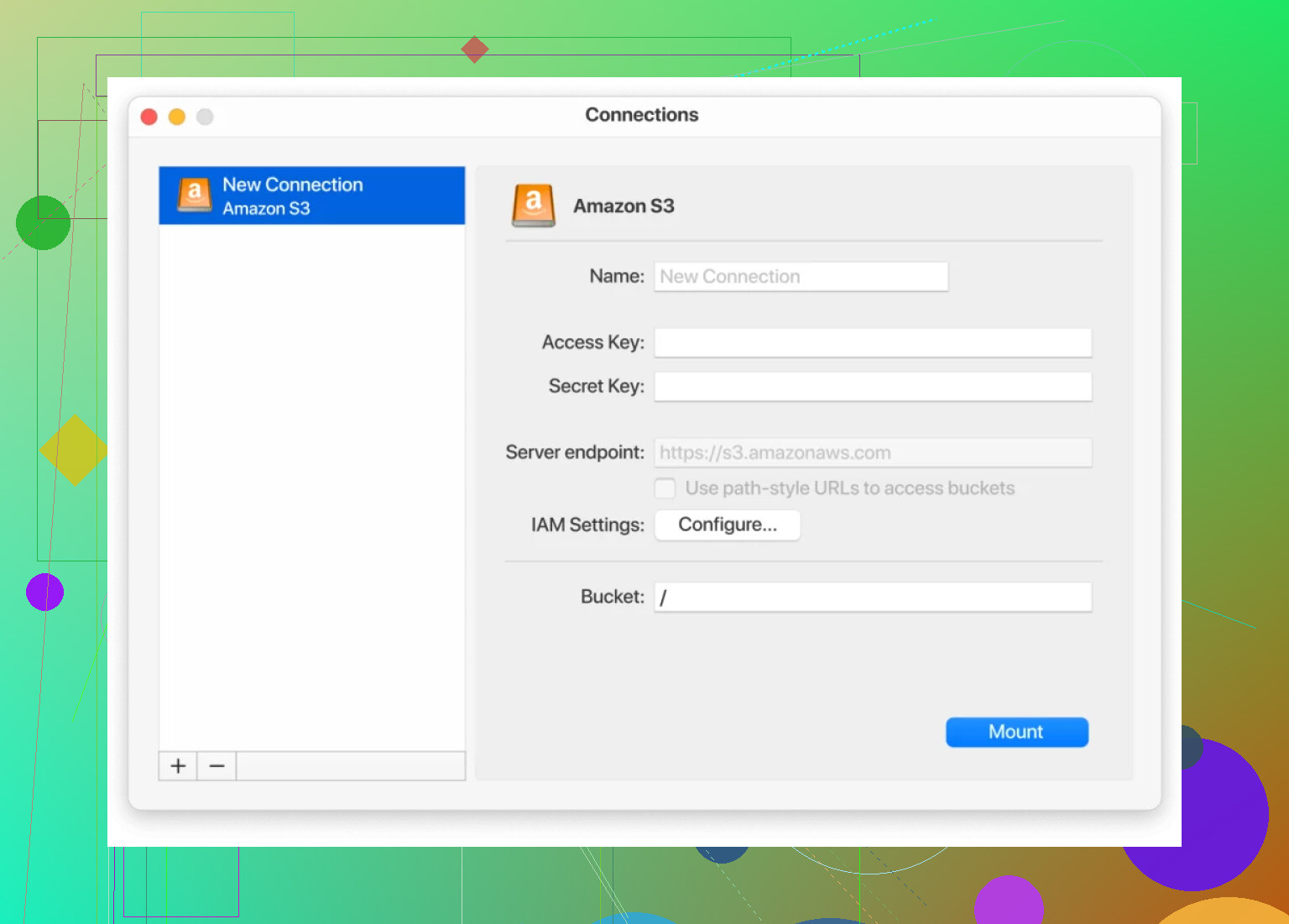
One thing that makes a big difference is mounting your S3 storage directly on your machine so it behaves like another local disk. On macOS, for example, there is:
With that, you basically:
- Point it at your S3 or S3‑compatible endpoint
- Add your keys / auth
- It shows up in Finder like another drive
Then you just drag and drop files, rename, move folders around, use your usual desktop tools, and it quietly syncs with the bucket in the background. No switching back to a browser every five seconds, no clunky upload forms, no babysitting progress bars in some tab.
The nice side effect is that this approach works across pretty much all S3‑compatible services, not just AWS, so you can use the same tool against things like Backblaze B2, Wasabi, DigitalOcean Spaces, etc., and not retrain your muscle memory for every provider.
22 Likes
I’m mostly on the same page as @mikeappsreviewer about the usual suspects, but I’d look at this less as “which S3 clone is best” and more as “how do I combine a cheaper object store with simpler ops.”
A few angles that haven’t really been covered:
1. R2 / B2 / Wasabi as egress shields for S3
You don’t necessarily have to nuke S3 from orbit. For a lot of teams, the killer cost is egress + cross‑region, not raw storage.
Pattern that works well:
- Keep “hot” / frequently written data in S3 in a single region
- Sync public or semi‑static data out to:
- Cloudflare R2 (no public egress, great if you already use Cloudflare)
- Backblaze B2 (especially if you front it with Cloudflare’s CDN, egress is effectively free)
- Serve end‑user traffic from R2/B2 while S3 becomes more of a source‑of‑truth or backup
This way you slowly starve your S3 bill instead of doing a terrifying big‑bang migration.
2. Hetzner Storage Boxes / Object Storage (if you’re EU‑friendly)
Not S3’s global footprint, but:
- Hetzner Object Storage: S3‑compatible, significantly cheaper, decent performance
- Storage Boxes: more like a big remote filesystem (WebDAV, SFTP, etc.) for backups, logs, artifacts
If your compliance story allows EU‑centric infra, Hetzner is stupidly cost‑effective. You trade some fancy lifecycle features for “it’s cheap and it works.”
3. MinIO or Ceph if you’re willing to self‑host
If you have decent ops skills (or a DevOps masochist on the team):
-
MinIO:
- S3‑compatible
- Horizontal scaling, erasure coding, good performance
- Great when you want on‑prem or your own cloud account to behave like S3
-
Ceph + S3 gateway:
- More complex, but very scalable
- Makes sense in larger setups where you already run Kubernetes / bare‑metal clusters
Downside: you’re now the storage provider. If your main complaint is complexity, this can easily be more painful than AWS.
4. Simplifying the day‑to‑day pain
You mentioned lifecycle rules and buckets being annoying. Honestly, that does not get magically better on GCP or Azure. Their rule engines are just as confusing, sometimes worse.
What does help regardless of provider:
- Use S3‑compatible tools across all providers
- Mount object storage as a drive so you stop living in web consoles
On macOS and Windows, CloudMounter is a legit quality‑of‑life upgrade:
- Mount S3 or S3‑compatible endpoints (B2, Wasabi, DigitalOcean Spaces, etc.) as a network drive
- Drag and drop, rename, move around like a local folder
- Works the same if you later move from S3 to R2/B2/Spaces
It doesn’t fix billing, but it absolutely fixes the “console UX is torture” part.
5. Rough decision cheatsheet
If I were you and mainly worried about cost + complexity:
- Already deep in AWS and don’t want a hard cutover:
- Keep S3, offload public assets to Cloudflare R2 or B2
- Heavy Cloudflare usage, lots of public traffic:
- R2 first, S3 as backup/ingest
- Backup / archive focus, predictable costs:
- Wasabi or B2
- EU‑centric, cost‑sensitive, ok with fewer bells & whistles:
- Hetzner Object Storage
- Have infra skills and want full control:
- MinIO cluster, maybe still fronted by Cloudflare
Personally I would not jump to GCS or Azure Blob purely for “simplicity.” They’re powerful, but you’ll swap one kind of complexity for another and your bill can still get weird fast.
You’ve already got solid overviews from @mikeappsreviewer and @shizuka, so I’ll skip re-listing the same providers and focus on how to pick and actually live with an S3 alternative without hating your future self.
Hot take: if your main issues are cost + lifecycle + cross‑region complexity, just jumping to GCS or Azure will not magically fix that. Their consoles are just as noisy, sometimes worse.
1. Decide what you actually need from “S3”
S3 is a bundle of things:
- Object storage
- Ridiculous regional footprint
- Fine‑grained IAM
- Lifecycle / replication rules
- Tight AWS integration
Most S3 alternatives are cheaper because they quietly drop one or more of those. Before chasing lower per‑GB pricing, figure out your must‑haves:
- Do you really need multi‑region writes, or is “one region + CDN” enough?
- Do you rely on IAM conditions and fancy policies, or are simple keys fine?
- Is this mostly public assets, logs, or user uploads?
A lot of people overpay for AWS features they never use.
2. A pattern that works better than “full migration”
I somewhat disagree with the implied “pick one competitor and move everything” angle. That’s the scary path.
A more boring but safer pattern:
- Keep S3 as the authoritative store for write‑heavy or critical data.
- Push public / static assets to a cheaper S3‑compatible store:
- R2 if you already use Cloudflare a lot.
- B2 or Wasabi if your usage is more backup / archive style.
- Put a CDN in front and let that handle global distribution.
This turns S3 into the “expensive database” that barely serves end‑users directly, which is usually where your bill explodes.
3. Reducing the “bucket & lifecycle hell” issue
Changing vendors does not fix the mental overhead of bucket layouts and lifecycle rules. Everyone copied AWS’s complexity with slight variations.
What actually helps:
- Standardize naming: one naming scheme across providers so you don’t have to think every time you create a bucket.
- Versioning only where it matters. People blindly turn on versioning and pay to keep thousands of zombie objects forever.
- Start with very simple lifecycle rules first (like: “delete after 30 days” for logs) instead of trying to replicate your full S3 ruleset day one.
4. Day‑to‑day workflow: stop living in the web UIs
Here I 100% agree with both of them: working via any cloud console is awful. But I’ll double‑down:
Get yourself a proper client that treats object storage like a drive. CloudMounter is actually pretty decent for this:
- Mount S3 or S3‑compatible storage as a network drive.
- Use Finder / Explorer like it’s a normal folder.
- Swap backends under the hood: today S3, tomorrow Wasabi or B2, your workflow barely changes.
The neat part: if you do split across providers (say S3 + R2 + B2), having them all show up as drives is way less brain damage than juggling three vendor consoles.
5. How I’d choose in your situation
If I map your concerns to a short list:
- Rising costs
- Push public traffic to R2 or B2. Keep S3 for hot writes or where you need deep AWS integration.
- Lifecycle complexity
- Use simpler policies in the cheaper store, and consider keeping S3 mostly as long‑term, organized data with minimal rules.
- Cross‑region pain
- Pick a single primary region and rely on CDN rather than multi‑region buckets, unless you truly need multi‑region writes.
If you really want a clean break from AWS, I’d prioritize:
- Cloudflare R2 for public assets if you have lots of outbound traffic.
- Backblaze B2 or Wasabi if you’re more backup / archive heavy and want predictable bills.
- Hetzner Object Storage only if EU focus and “screw global footprint, I just want cheap and solid.”
Just don’t expect any provider’s UI or lifecycle system to be “simple.” The biggest win is usually: simplify your own usage patterns, then swap in a cheaper S3‑compatible backend, and use something like CloudMounter so your daily interaction isn’t in yet another clunky web panel.